VLM Query
Uses Vision Language Models to answer questions about images by analyzing visual content and understanding natural language queries.
Quick Start
To get started:
- Choose a model from the Model to use dropdown
- Send image path via
msg.payload.image_path - Send prompt via
msg.payload.prompt - Receive answer in
msg.payload
Configuration
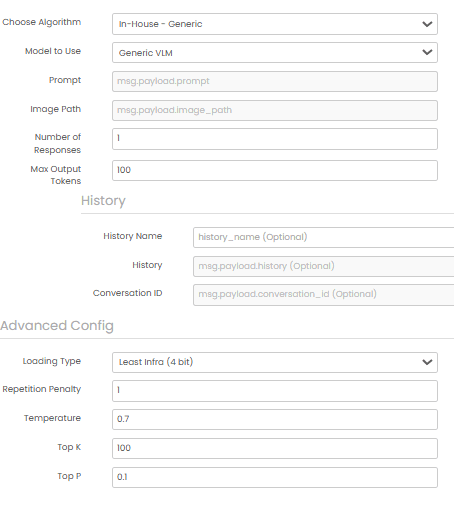
Model to use (required)
Select a vision language model from the dropdown menu.
Common Input Format (All Algorithms)
msg.payload.image_path (string)
Relative path of the image file on shared storage.
Example: "images/document.jpg"
msg.payload.prompt (string)
Question or prompt about the image.
Example: "What objects are visible in this image?"
Common Output Format (All Algorithms)
msg.payload (object)
msg.payload contains an output field with the answer to the query.
Example: {"output": "The image contains a car, a tree, and a building."}
Example
Input (msg.payload)
{
  "image_path": "images/document.jpg",
  "prompt": "What objects are visible in this image?"
}
Output (msg.payload)
{
  "output": "The image contains a car, a tree, and a building."
}
Errors
When the block fails, it raises an error. Use a Catch block in your flow to handle failures and inspect the error payload.
Common mistakes
- Missing image path:
msg.payload.image_pathis required and must point to a file on shared storage. - Empty prompt:
msg.payload.promptmust be a non-empty string.
Best Practices
- Use clear, specific questions for better answers
- Ensure images are well-lit and clear
- Test different models to find the best fit
- Validate answers in production applications