Document Understander
Extracts specific fields and their values from document images. It identifies and labels entities like invoice numbers, amounts, dates, and other structured fields based on the trained model.
Quick Start
To get started:
- Choose a trained model from the Model to use dropdown
- Select Output Type: Collated Fields (structured) or Uncollated Fields (raw labels)
- Send document image via
msg.payload.image_path - Optionally provide OCR data via
msg.payload.words_and_bboxes - Receive extracted fields in
msg.payload
Configuration
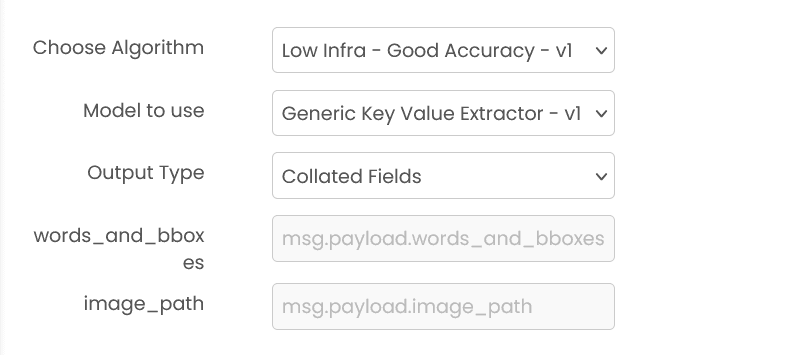
Model to use (required)
Select a pre-trained model from the dropdown menu. Models must be trained beforehand using the sequence labeler trainer block.
Output Type (required)
Choose how extracted fields should be formatted:
- Collated Fields: Returns structured field-value pairs with coordinates and confidence scores
- Uncollated Fields: Returns raw word-level labels with individual bounding boxes
Common Input Format (All Algorithms)
msg.payload.image_path (string)
Relative path of the document image file on shared storage.
Example: "documents/invoice.png"
Supported formats: .png, .jpg, .jpeg (case insensitive)
msg.payload.words_and_bboxes (array, optional)
Optional OCR data containing words and bounding boxes. Can improve extraction accuracy.
Format: [[[x1, y1, x2, y2], "word"], ...]
Example: [[[100, 100, 300, 150], "Invoice"], [[100, 200, 200, 250], "Total"]]
Output by Output Type
Collated Fields
msg.payload contains an output array of field objects:
{
  "output": [
    {
      "field_name": "invoice_number",
      "co_ordinate": [470, 100, 180, 50],
      "field_value": "INV-001",
      "confidence_score": null
    },
    {
      "field_name": "total_amount",
      "co_ordinate": [220, 200, 130, 50],
      "field_value": "$500.00",
      "confidence_score": null
    }
  ]
}
Note: co_ordinate is in [x, y, width, height] format. confidence_score is currently not computed.
Uncollated Fields
msg.payload contains word-level data:
{
  "words": ["Invoice", "Number:", "INV-001", "Total:", "$500.00"],
  "normalized_bboxes": [[...], [...], ...],
  "unormalized_bboxes": [
    [100, 100, 300, 150],
    [320, 100, 450, 150],
    [470, 100, 650, 150],
    [100, 200, 200, 250],
    [220, 200, 350, 250]
  ],
  "labels": ["other", "other", "invoice_number", "other", "total_amount"]
}
Example
Input (msg.payload)
{
  "image_path": "documents/invoice.png",
  "words_and_bboxes": [
    [[100, 100, 300, 150], "Invoice"],
    [[470, 100, 650, 150], "INV-001"]
  ]
}
Output (msg.payload)
{
  "output": [
    {
      "field_name": "invoice_number",
      "co_ordinate": [470, 100, 180, 50],
      "field_value": "INV-001",
      "confidence_score": null
    }
  ]
}
Errors
When the block fails, it raises an error. Use a Catch block in your flow to handle failures and inspect the error payload.
Common mistakes
- Missing image path:
msg.payload.image_pathis required and must point to a file on shared storage. - Wrong OCR structure: If provided,
msg.payload.words_and_bboxesmust follow[[[x1, y1, x2, y2], "word"], ...]. - Wrong output type: Use Collated Fields for structured field-value pairs, and Uncollated Fields for raw labels.
Best Practices
- Use clear, well-scanned document images for better field extraction accuracy
- Provide OCR data (words_and_bboxes) whenever available to improve extraction results
- Use Collated Fields for most use cases as it provides structured, ready-to-use field-value pairs
- Use Uncollated Fields when you need raw word-level labels or want to implement custom collation logic
- Ensure your training data includes diverse examples of each field type you want to extract
- Regularly retrain models as document layouts or field types evolve
- Always validate extracted fields in production applications, especially for critical data
Document Question Answering
Extracts answers to specific questions from document images. It can identify and return answers with or without their location coordinates (bounding boxes) in the document.
NLP Classifier
Classifies text into predefined categories using Natural Language Processing. It can categorize text by sentiment, topic, intent, or any custom classification scheme based on the trained model.