LLM Context Retriever
Retrieves context from indexed content. It supports pure text retrieval, image retrieval, and hybrid modes where both are fetched independently or sequentially.
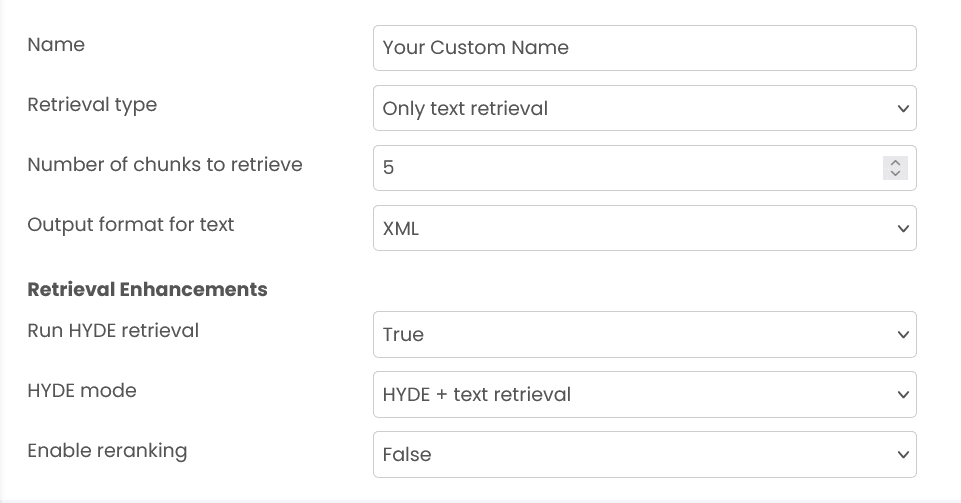
Retrieval Types
Only text retrieval
Returns text chunks from your indexed content. HYDE and reranking can optionally refine the results.
Only text retrieval (graph based)
Retrieves text context using a knowledge graph (graph-backed retrieval). This mode returns structured graph data (entities + relationships) along with the matched document chunks you can feed into an LLM.
In this mode, HYDE and classic reranking controls are not used.
Only image retrieval
Retrieves image matches only. Chunk-related options are hidden and the default image count is 5 (overridable).
Text and image (separate)
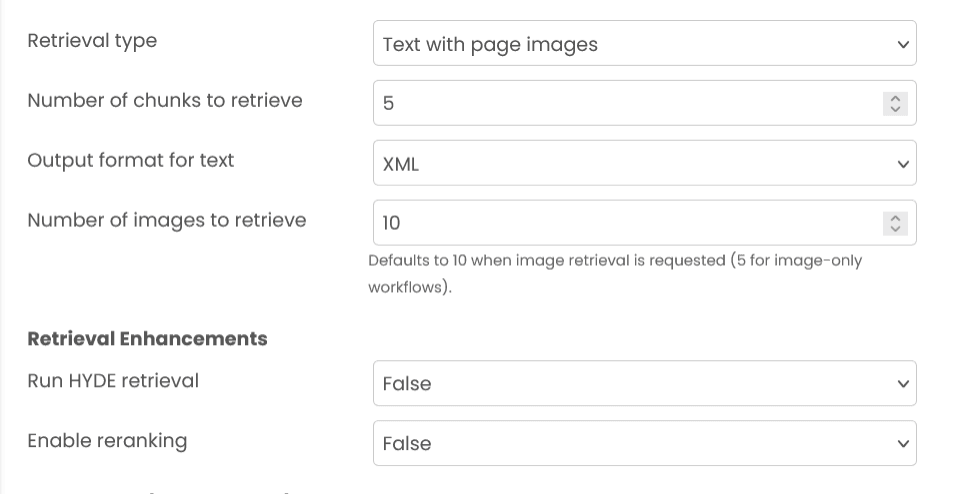
Runs text retrieval and gets you matching text chunks and images.
Image -> metadata filter -> text
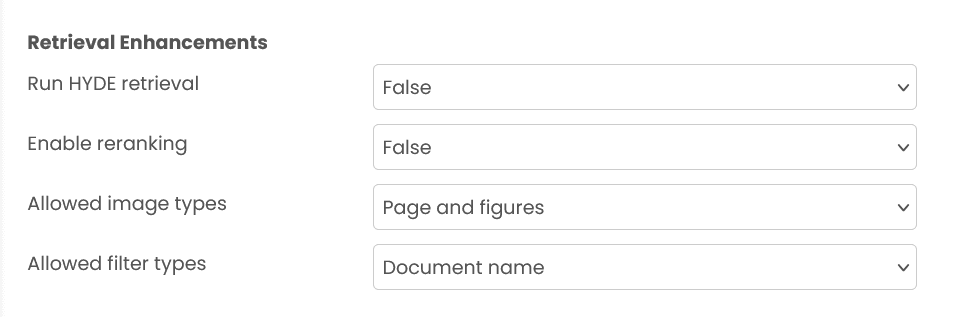
Fetches candidate images first, applies metadata filters derived from them, then queries the text collection to get matching text chunks.
Non-embedding based
Skips embedding-based retrieval. Supply your own query or aggregation pipeline for direct database access.
Ranking Enhancements
- Run HYDE retrieval - Requires selecting a HYDE mode when enabled. Provide
hyde_queryin the input (you can generate it using the LLM Query v2 block). - Enable reranking - Re-scores the retrieved text chunks using the chosen reranking model. Available for text-capable retrieval modes.
- Graph-based retrieval note - Not available for Only text retrieval (graph based). Use the knowledge-graph settings instead (see Key Options).
Defaults
- Chunks default to 5 when text is involved.
- Images default to 10.
- Text output is JSON by default; switch to XML if required.
Database Operations (Non-embedding based)
query (array | object)
- Array: Aggregation pipeline is performed. Each element in the array represents a pipeline stage.
- Object: Find operation is performed using the object as the query filter.
Performance Considerations
- Query Validation - Always double-check your query before running it, as poorly constructed queries may cause significant performance impact on the database.
- Result Limiting - If no limit is applied to your query, it may return all results, which can significantly impact block response time and system performance.
- Index Usage - Ensure your queries utilize appropriate database indexes for optimal performance.
Key Options
- output_format_for_text:
json|xml- JSON - Returns
resultsas a list of objects (best for programmatic use). - XML - Returns the normal JSON
resultsand also anxml_formatted_stringwhich is a single concatenated string of the matched contents, clearly grouped and separated bydocument_name. This grouping can improve downstream LLM accuracy versus plain JSON or naive concatenation.
- JSON - Returns
- run_hyde_rag - Boolean to enable HYDE. Provide
hyde_queryexplicitly when enabled. - select_hyde_mode - When HYDE is on, choose
only_hyde(use HYDE matches only) orhyde_rag_text_rag_merged_rerank(combine normal + HYDE, optional rerank). - reranking and reranking_instruction - If enabled, results are re-scored according to your instruction to surface the most relevant chunks first.
- number_of_chunks_to_retrive / number_of_images_to_retrive - Caps for text/image results (not used in non-embedding Mongo queries unless you add limits in your query/pipeline).
- Graph-based text retrieval controls (only for Only text retrieval (graph based)):
query_mode,top_k,chunk_top_k,max_entity_tokens,max_relation_tokens,max_total_tokens,enable_rerank, and optionaluser_prompt.- Note:
output_format_for_text,run_hyde_rag, andrerankingare not used in graph-based retrieval.
- Note:
Inputs (msg.payload) by Retrieval Type
Only text retrieval
Required: query (string), collection_name (string).
If required by your data source: mongodb_uri, mongodb_db_name.
Optional: retrieval_instruction (string; required for some models/collections), mongodb_filter (object or array), qdrant_filter (object), reranking_instruction (string), number_of_chunks_to_retrive (int), output_format_for_text (json|xml), hyde_query (string when HYDE is enabled).
Only text retrieval (graph based)
Required: query (string), collection_name (string), models (object).
models must include:
models.entity_extraction_llm:{ provider, model, credentials?: { api_key?: string }, config?: object }models.query_llm:{ provider, model, credentials?: { api_key?: string } }models.embedding:{ provider, model, dimension (int), credentials?: { api_key?: string } }
Optional: user_prompt (string).
Constraint: collection_name must point to a collection created with graph_based text storage (the Indexer must have used graph-based mode).
Only image retrieval
Required: query (string), collection_name (string).
Optional: qdrant_filter (object), number_of_images_to_retrive (int).
Text and image (separate)
Same as Only text retrieval for inputs. Images are derived from text metadata; no additional image inputs are required.
Image -> metadata filter -> text
Required: query (string), collection_name (string).
If required for text retrieval: mongodb_uri, mongodb_db_name.
Optional: retrieval_instruction (string; required for some models/collections), qdrant_filter (object for image stage), filter_type (document_name|document_name_and_page_number), number_of_images_to_retrive, number_of_chunks_to_retrive, output_format_for_text.
Non-embedding based
Required: query (object for find or array for aggregate), mongodb_uri, mongodb_db_name, collection_name.
Behavior: Executes exactly the query you provide and returns all matches.
Outputs
The block sends retrieval results directly as msg.payload.
- Only text retrieval -
{ results: [...], xml_formatted_string?: string } - Only text retrieval (graph based) -
{ knowledge_graph_entities: [...], knowledge_graph_relationships: [...], document_chunks: [...], reference_documents: [...], generated_answer?: string | null, metadata: {...}, token_usage?: {...}, traces?: [...] } - Only image retrieval -
{ results: [...image objects...] } - Text and image (separate) -
{ results: [...text...], image_results: [...derived images...] } - Image -> metadata filter -> text -
{ results: [...text...], image_results: [...images...], derived_image_results?: [...images...] } - Non-embedding based -
{ results: [...documents...] }
Output key definitions
results (array)
Primary result list.
- Text modes: array of objects with
text(string),metadata(object), andscore(number, optional). - Only image mode: array of image objects (see image_results schema).
- Non-embedding Mongo: array of raw documents (with
_idnormalized to string).
Graph-based retrieval keys (Only text retrieval - graph based)
knowledge_graph_entities: extracted entities from your documents (list).knowledge_graph_relationships: relationships between extracted entities (list).document_chunks: matched text chunks you can pass to an LLM.reference_documents: reference list pointing to source file paths.generated_answer: optional generated answer text (may benull).metadata: query metadata (mode, keywords, etc.).token_usageandtraces: optional execution details returned by the platform.
image_results (array)
Image matches when image retrieval is involved. Each item has:
type("page" | "figure")image(filename)path(absolute path)starting_page_number(int)ending_page_number(int)document_name(e.g.,your_file.pdf)
derived_image_results (array)
Images derived from final text matches (image -> text flow). Same schema as image_results.
xml_formatted_string (string)
Present when output_format_for_text=xml. A single concatenated XML string of the matched contents, clearly grouped and separated by document_name to aid LLM consumption.
error (string)
Error description when the operation fails instead of returning results.
Recommendations for Best Use
- Use HYDE for complex queries - Enable HYDE retrieval when dealing with abstract or conceptual questions where a hypothetical answer can better capture semantic intent than the raw query alone.
- Apply reranking for precision - Enable reranking with a clear instruction when you need the most relevant results at the top. This is especially useful when retrieving larger result sets (10+ chunks) where initial ranking may be suboptimal.
- Choose XML format for LLM consumption - Use
xmloutput format when passing results directly to an LLM. The document-grouped structure helps LLMs better understand source boundaries and attribution. - Limit results appropriately - Start with conservative limits (5-10 chunks) and increase only if needed. More results increase LLM context usage and may introduce noise that degrades answer quality.
- Use filters to narrow scope - Apply
mongodb_filterorqdrant_filterto restrict searches by metadata (document type, date range, source). This improves both speed and relevance. - Leverage image-to-text retrieval strategically - Use the "Image -> metadata filter -> text" mode when visual elements are key to understanding, then retrieve surrounding text context. This is ideal for technical documents with diagrams or charts.
Example
Input (msg.payload) - Only text retrieval
{
  "query": "What is the warranty period?",
  "collection_name": "policies",
  "number_of_chunks_to_retrive": 5,
  "output_format_for_text": "json"
}
Output (msg.payload)
{
  "results": [
    {
      "text": "Warranty: 12 months from the purchase date...",
      "metadata": { "document_name": "terms.pdf", "page_number": 2 },
      "score": 0.82
    }
  ]
}
Input (msg.payload) - Only text retrieval (graph based)
{
  "query": "What is the warranty period?",
  "collection_name": "policies",
  "models": {
    "entity_extraction_llm": { "provider": "openai", "model": "gpt-4o-mini" },
    "query_llm": { "provider": "openai", "model": "gpt-4o-mini" },
    "embedding": { "provider": "openai", "model": "text-embedding-3-small", "dimension": 1536 }
  },
  "user_prompt": "Answer using only the retrieved context."
}
Output (msg.payload)
{
  "knowledge_graph_entities": [{ "...": "..." }],
  "knowledge_graph_relationships": [{ "...": "..." }],
  "document_chunks": [{ "text": "...", "metadata": { "document_name": "terms.pdf" } }],
  "reference_documents": [{ "reference_id": "0", "file_path": "/path/to/terms.pdf" }],
  "generated_answer": null,
  "metadata": { "query_mode": "hybrid" }
}
Errors
When the block fails, it raises an error. Use a Catch block in your flow to handle failures and inspect the error payload.
Common mistakes
- Wrong retrieval type inputs: Each retrieval type has slightly different required fields. Double-check the section for your selected mode.
- Unbounded queries: For non-embedding mode, always include a limit in your query/pipeline if you might match many documents.
- Missing DB settings: Ensure required connection fields (like
mongodb_uri/mongodb_db_name) are set when needed.
LLM Context Indexer
Adds, updates, or deletes documents from vector or document stores, supporting multiple formats including PDF, WORD, MD, TXT, Excel, JSON, and images for RAG applications.
LLM Query v2
Allows you to interact with various Large Language Models (LLMs) to generate text-based responses for a wide range of tasks. It supports multiple providers including OpenAI, Azure OpenAI, Anyscale, Vertex AI, and In-House Hosted models with provider-specific configurations.