OCR Utils
Provides post-OCR matching utilities to find or validate words/phrases against OCR bounding boxes.
Quick Start
To get started:
- Select an operation from the Choose Operation dropdown
- Send OCR bounding boxes and the target word/phrase via
msg.payload - Receive matching results in
msg.payload
Configuration
Configuration varies by operation type.
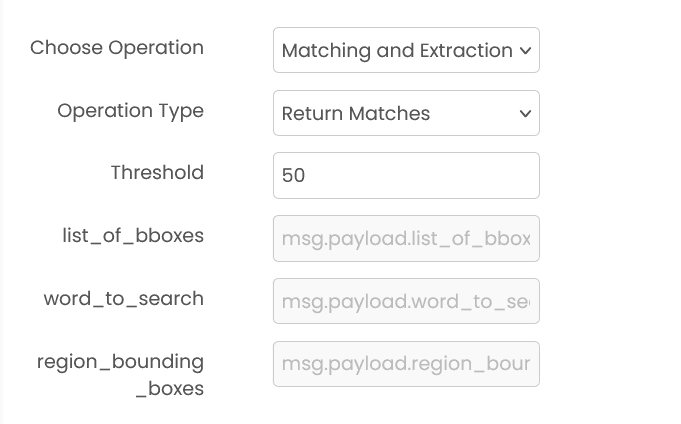
Common Input Format
msg.payload.word_to_search (string | array)
Word or phrase (or a list of words/phrases) to search for.
msg.payload.list_of_bboxes (array)
OCR corpus bounding boxes. This must be a list in one of these common formats:
- Word-level:
[[[x1, y1, x2, y2], "text"], ...] - Phrase-level:
[[[x1, y1, x2, y2], [[[x1, y1, x2, y2], "text"], ...], "phrase text"], ...]
msg.payload.region_bounding_boxes (array, optional)
Restrict matching to one or more regions.
Format: [[x1, y1, x2, y2], ...]
Output by Operation
msg.payload contains an output field with the results.
Return Matches (matching)
msg.payload.output is a dictionary keyed by the searched word/phrase.
Validate Word (validate_word)
msg.payload.output is an object with a matches field.
Available Operations
This block currently supports:
- Return Matches (matching)
- Validate Word (validate_word)
Example
Input (msg.payload)
{
  "word_to_search": "Invoice",
  "list_of_bboxes": [[[10, 20, 50, 40], "Invoice"], [[60, 70, 100, 90], "Total"]]
}
Output (msg.payload)
{
  "output": {
    "Invoice": [
      { "word": "Invoice", "word_bbox": [10, 20, 50, 40], "confidence": 100.0, "edit_distance": 0 }
    ]
  }
}
Errors
When the block fails, it raises an error. Use a Catch block in your flow to handle failures and inspect the error payload.
Common mistakes
- Invalid OCR format: Input data doesn't match expected OCR format.
- Missing required fields:
word_to_searchandlist_of_bboxesare required. - Service unavailable: The service is unavailable or unreachable.
Best Practices
- Use OCR Utils after OCR block to post-process results
- Group words into lines for better readability
- Filter low-confidence results to improve quality
- Sort results by position for logical text flow
Object Detector
Detects and localizes objects within images. It identifies objects by drawing bounding boxes around them and provides class labels and confidence scores for each detection.
OCR (Optical Character Recognition)
Extracts text from images using Optical Character Recognition. It can detect and recognize both printed and handwritten text, returning words with their bounding box coordinates.