Object Detector
Detects and localizes objects within images. It identifies objects by drawing bounding boxes around them and provides class labels and confidence scores for each detection.
Quick Start
To get started:
- Choose a trained model from the Model to use dropdown
- Set threshold values to control detection sensitivity
- Send image path via
msg.payload.image_path - Receive detected objects with bounding boxes in
msg.payload
Configuration
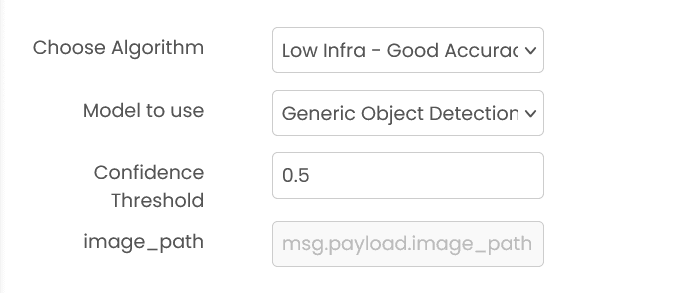
Model to use (required)
Select a pre-trained model from the dropdown menu. Models must be trained beforehand using the object detection trainer block.
Confidence Threshold (required)
Minimum confidence score (0-1) for detected objects. Default: 0.5
Note: Lower values detect more objects with potentially lower confidence.
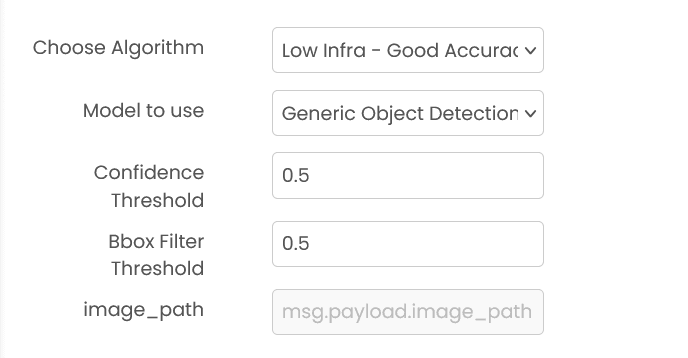
Bbox Filter Threshold (for v1 and Low Accuracy)
IOU threshold (0-1) for filtering overlapping bounding boxes. Default: 0.5
Note: Higher values allow more overlapping boxes, lower values filter out more overlaps.
Common Input Format (All Algorithms)
msg.payload.image_path (string)
Relative path of the image file on shared storage.
Example: "images/street.jpg" or "photos/product.png"
Supported formats: .png, .jpg, .jpeg (case insensitive)
Output by Model Type
msg.payload contains an output field with the detection results.
Low Infra - Good Accuracy - v1
msg.payload.output is an array of detections with the format:
[[x1, y1, x2, y2, confidence, class_id], ...]
Example: {"output": [[100, 150, 300, 400, 0.89, 2], [350, 200, 500, 450, 0.76, 0]]}
Low Infra - Low Accuracy
msg.payload.output is an array of detections with the format:
[[x1, y1, x2, y2, confidence, class_id], ...]
Example: {"output": [[100, 150, 300, 400, 0.89, 2], [350, 200, 500, 450, 0.76, 0]]}
Low Infra - Good Accuracy - v2
msg.payload.output is an array of detections with the format:
[[x1, y1, x2, y2, class_id, confidence], ...]
Example: {"output": [[100, 150, 300, 400, 2, 0.89], [350, 200, 500, 450, 0, 0.76]]}
Note: Coordinates are [top-left-x, top-left-y, bottom-right-x, bottom-right-y]. class_id is a numeric label index.
Multiple threshold configuration
Some configurations expose multiple threshold fields for tuning recall vs precision.
Example
Input (msg.payload)
{
  "image_path": "images/street.jpg"
}
Output (msg.payload)
{
  "output": [
    [100, 150, 300, 400, 0.89, 2],
    [350, 200, 500, 450, 0.76, 0]
  ]
}
Errors
When the block fails, it raises an error. Use a Catch block in your flow to handle failures and inspect the error payload.
Common mistakes
- Missing or wrong image path:
msg.payload.image_pathis required and must point to a file on shared storage. - Threshold out of range: Threshold values must be between 0 and 1.
- No objects detected: Lower the confidence threshold, or verify the model supports the objects present in the image.
Best Practices
- Use high-quality, well-lit images for optimal detection accuracy
- Start with confidence threshold 0.5 and adjust based on results
- Lower threshold (0.3-0.4) for detecting more objects, higher (0.6-0.8) for more reliable detections
- Use Bbox Filter Threshold around 0.5 to balance between duplicate detections and missing close objects
- Ensure training data includes diverse examples of objects in various conditions
- Regularly retrain models as object appearances or environments change
- Always validate detection results in production applications