PDF Processor
Provides PDF utilities such as searchability checks, OCR, table extraction, and splitting PDFs into images.
Quick Start
To get started:
- Select an operation from the Choose Operation dropdown
- Configure operation-specific parameters
- Send PDF path via
msg.payload.pdf_path - Receive the operation result in
msg.payload
Configuration
Configuration varies by operation type.
Common Input Format
msg.payload.pdf_path (string)
Relative path of the PDF file on shared storage.
Example: "documents/report.pdf"
Common Output Format
Output format varies by operation (image paths, OCR results, table extraction results).
Available Operations
The PDF Processor block supports the following operations:
- Searchable or Scanned (
is_searchable)- Input:
msg.payload.pdf_path(string) - Config:
line_count(number) - Output (msg.payload):
true|false
- Input:
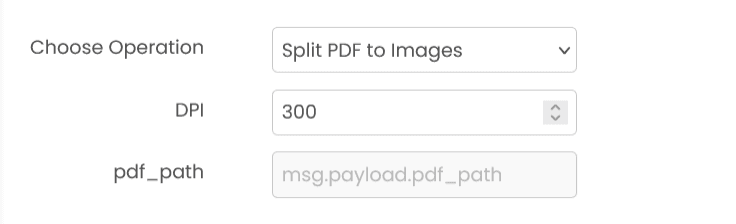
- Split PDF to Images (
split_pdf_to_images)- Input:
msg.payload.pdf_path(string) - Config:
dpi(number) - Output (msg.payload): array of generated image filenames (strings)
- Input:
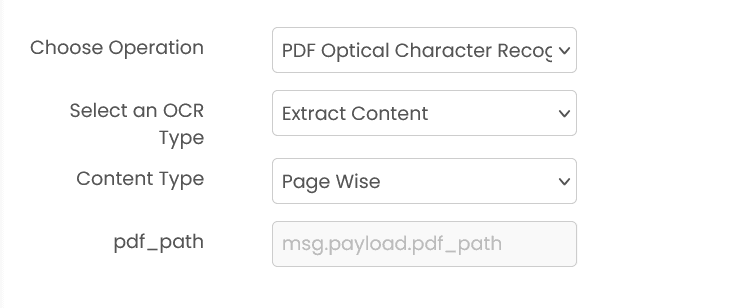
- PDF OCR (
pdf_ocr)- Input:
msg.payload.pdf_path(string) - Optional input:
msg.payload.pages(array of page numbers) for page-scoped OCR modes - Config:
ocr_type(string) - Config:
content_type(string, only for “extract content” modes) - Config:
width/height(numbers, only for “pages and words” modes) - Output (msg.payload): varies by selected
ocr_type
- Input:
- Table Extraction (
table_extraction)- Input:
msg.payload.pdf_path(string) - Config: Type of Extractor with options Algorithm - 1, Algorithm - 2, or Default Extraction
- Output (msg.payload): extracted table artifact(s), depending on the selected extractor
- Input:
Common Errors
- Invalid PDF path: PDF file doesn't exist on shared storage.
- Corrupted PDF: PDF file is corrupted or unreadable.
- Invalid page numbers: Specified page numbers are out of range.
- Service unavailable: The service is unavailable or unreachable.
Best Practices
- Convert PDFs to images for document processing workflows
- Extract specific pages to reduce processing time
- Merge PDFs to consolidate related documents
- Split large PDFs for parallel processing
- Handle password-protected PDFs appropriately
- Clean up generated files after processing
OCR (Optical Character Recognition)
Extracts text from images using Optical Character Recognition. It can detect and recognize both printed and handwritten text, returning words with their bounding box coordinates.
Signature Matcher
Compares two signature images to determine if they match. It calculates a similarity score to verify if signatures are from the same person.