BlocksComputer Vision Blocks
Template Matcher
Finds a template image within a larger image and returns the cropped match (when found).
Quick Start
To get started:
- Provide main image path via
msg.payload.image_path - Provide template image path via
msg.payload.template_path - Set Minimum Features to be Matched (%) threshold
- Receive match locations in
msg.payload
Configuration
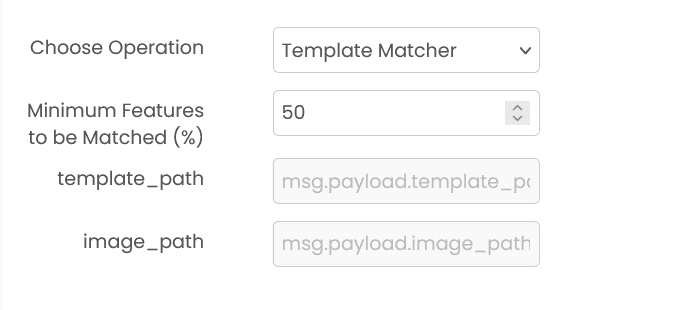
Minimum Features to be Matched (%) (required)
Percentage of features (0-100) that must match for template detection. Default: 50
Note: Higher values require more precise matches, lower values are more tolerant.
Common Input Format
msg.payload.image_path (string)
Relative path of the main image on shared storage.
Example: "images/document.png"
msg.payload.template_path (string)
Relative path of the template image to find.
Example: "templates/logo.png"
Common Output Format
msg.payload (object | string)
Returns match details if found, or a "Match not found" message.
Example: {"matched_template": "document_crop.png", "number_of_features_matched": 87}
Example
Input (msg.payload)
{
  "image_path": "images/document.png",
  "template_path": "templates/logo.png"
}
Output (msg.payload)
{
  "matched_template": "document_crop.png",
  "number_of_features_matched": 87
}
Errors
When the block fails, it raises an error. Use a Catch block in your flow to handle failures and inspect the error payload.
Common mistakes
- Invalid image path: Main image or template image path is incorrect or file doesn't exist.
- Template larger than image: Template image dimensions exceed the main image dimensions.
- Invalid threshold: Feature match percentage must be between 0 and 100.
- No matches found: Try lowering the feature match threshold.
- Service unavailable: The service is unavailable or unreachable.
Best Practices
- Ensure template image is clear and well-defined
- Use templates that are roughly the same scale as they appear in the target image
- Start with 50% feature matching and adjust based on results
- Lower threshold (30-40%) for more matches with variations, higher (60-80%) for exact matches
- Template should be significantly smaller than the main image
- Use consistent image formats for both main and template images
- Test with sample images to determine optimal threshold for your use case
- Consider image quality and resolution when setting expectations