LLM Context Indexer
Adds, updates, or deletes documents from vector or document stores, supporting multiple formats including PDF, WORD, MD, TXT, Excel, JSON, and images for RAG applications.
Supported Document Types
PDF / WORD
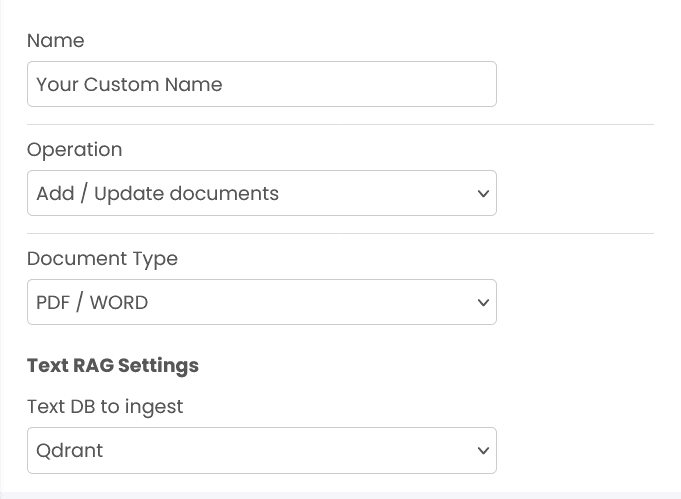
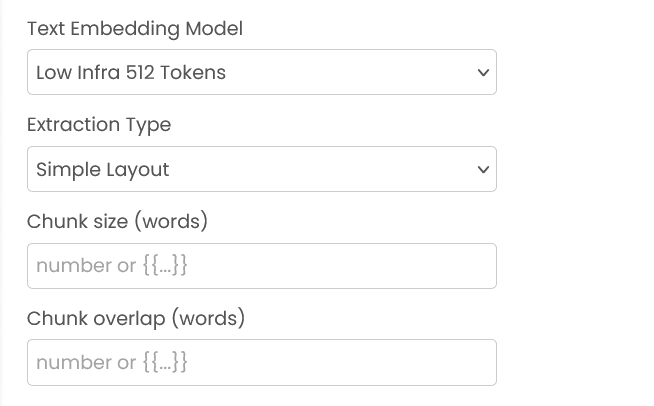
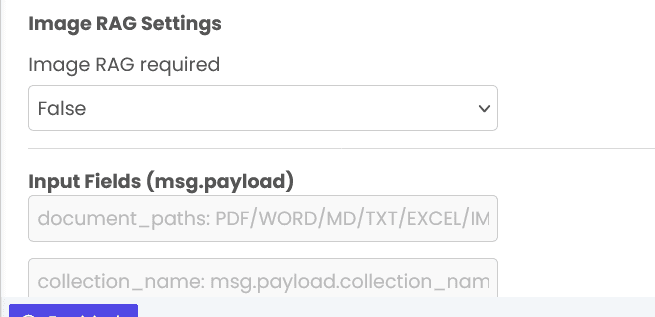
PDF and WORD documents support layout or markdown extraction, with an optional image RAG pass.
MD / TXT
Markdown and text files with configurable chunk size and overlap.
Excel
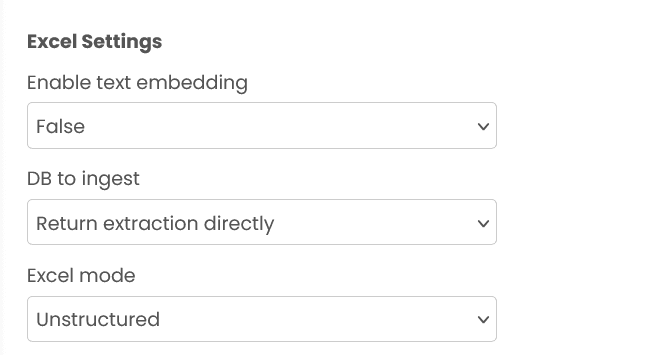
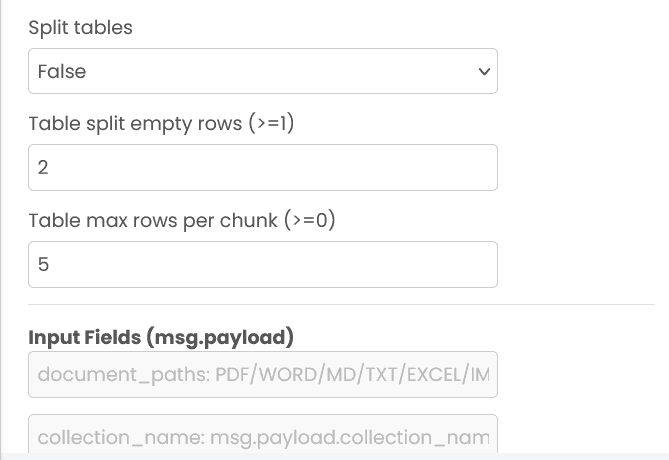
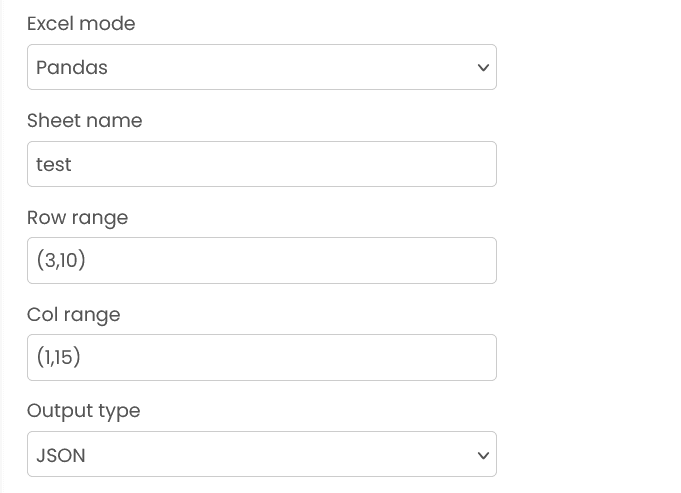
Unstructured or pandas style processing. You can choose a storage option to ingest the extracted content, or select "Return extraction directly" to bypass storage.
JSON
Ingest raw JSON documents (non-embedding by default) or optionally embed a chosen content field.
IMAGE
Image embedding ingestion (enabled via the Image RAG option).
Unified Collection Management
The indexer uses a unified collection approach where a single collection_name represents both text and image modalities for PDF/WORD documents. If the UI option for Image RAG is enabled, image embeddings are ingested for supported document types.
Graph-based RAG (knowledge-graph-backed indexing)
When you want retrieval based on a knowledge graph (instead of only vector similarity), configure your text storage as graph_based.
When this applies
- For PDF/WORD/MD/TXT-style ingestion: set
msg.payload.text_db_to_ingest = "graph_based". - For JSON ingestion: you may set
msg.payload.db_to_injest = "graph_based"(legacy field).
Extra inputs required
Graph-based indexing requires additional model settings in your message payload:
msg.payload.models(object), containing:entity_extraction_llm:{ provider, model }query_llm:{ provider, model }embedding:{ provider, model, dimension }
The platform uses these models to extract entities/relationships from your documents, build/update the knowledge graph, and prepare chunk retrieval for downstream queries.
Practical constraints
embedding.dimensionmust be a valid number.- Provider/model combinations must be supported by your RAPFlow deployment (the UI typically lets you choose valid providers/models).
Embedding and reranking models
You can select embedding and reranking models from the options available in the editor UI. In general:
- Larger context models tend to produce richer embeddings but can increase latency and cost.
- If a token limit (or similar) is available, set it explicitly to match your retrieval needs.
Inputs and block configuration by document type
Common (all types unless noted)
PDF / WORD
MD / TXT
Excel
JSON
IMAGE
Outputs
The block sends the ingestion result directly as msg.payload. Common keys include:
Example
Input (msg.payload)
{
  "document_paths": ["docs/policies/terms.pdf"],
  "text_db_to_ingest": "qdrant",
  "collection_name": "policies",
  "extraction_type": "layout_based",
  "chunk_token_size": "auto"
}
Output (msg.payload)
{
  "status": "ok",
  "document_type": "pdf",
  "db": "qdrant",
  "failed_docs": [],
  "passed_docs": {
    "terms.pdf": {
      "num_chunks": 42,
      "num_images": 3
    }
  }
}
Delete Mode
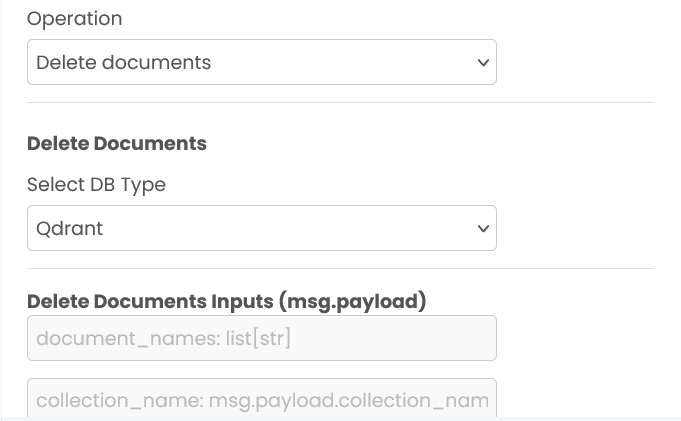
Select Delete documents to remove specific files using msg.payload.document_names. The system uses the unified collection approach:
- Base collection name: Provide
collection_nameto identify the logical collection - Automatic resolution: The system automatically routes the delete request to the correct storage for that collection
Select Delete collection to remove an entire collection:
- Base collection name: Provide
collection_nameto identify the logical collection - Complete removal: Removes all data associated with the base collection name
Errors
When the block fails, it raises an error. Use a Catch block in your flow to handle failures and inspect the error payload.
Validation failures (missing paths, invalid configuration, etc.) raise an editor error. Ensure all numeric fields are either numbers or valid {{...}} expressions.
Common mistakes
- Missing
document_paths: Provide at least one path (or JSON content depending on mode). - DB fields don’t match the selected mode: For example, some modes require storage connection fields; Excel “Return extraction directly” ignores storage settings.
- Invalid DB settings: Make sure connection values and collection values are set correctly for the selected mode.
Recommendations for Best Use
- Set explicit token limits when available: If the UI exposes a token limit, set it to match your retrieval needs to control cost and latency.
- Prefer non-embedding JSON unless needed: Only enable embedding-based indexing when you plan to retrieve by semantic similarity.
- Keep collections cleanly separated: Use distinct
collection_namevalues per project or dataset. Avoid reusing collection names across unrelated ingestions to prevent data mixing and maintain clear organizational boundaries. - Enable Image RAG selectively: For PDFs with images, only enable image RAG when you plan to retrieve by visual context (diagrams, charts, screenshots). Otherwise, skip image embedding to save processing time and storage costs.
- Use precise filters for non-embedding retrieval: Always pass a restrictive query/pipeline to avoid scanning full collections.
- Choose chunk parameters conservatively: Start with moderate
chunk_sizeandchunk_overlapvalues, then adjust based on retrieval quality.
Fetch History
Retrieves conversation history for LLM based on conversation ID, enabling multi-turn conversations with context.
LLM Context Retriever
Retrieves context from indexed content. It supports pure text retrieval, image retrieval, and hybrid modes where both are fetched independently or sequentially.