Image Processor
Performs core image processing operations such as resize, crop, orientation fix, and document enhancement.
Quick Start
To get started:
- Select an operation from the Choose Operation dropdown
- Configure operation-specific parameters
- Send image path via
msg.payload.image_path - Receive the operation result in
msg.payload
Configuration
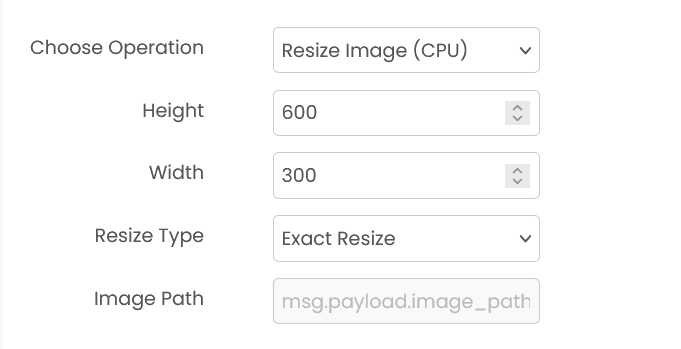
Configuration varies by operation type. Each operation has specific parameters.
Common Input Format (All Operations)
msg.payload.image_path (string)
Relative path of the image file on shared storage.
Example: "images/photo.jpg"
msg.payload.coordinates (array, for crop)
Crop rectangle as [x1, y1, x2, y2].
Example: [120, 80, 640, 420]
Output by Operation
Resize Image (CPU)
msg.payload contains an output string with the processed image path.
Example:
{"output": "abc123_resized_photo.jpg"}Crop an Image (CPU)
msg.payload is a string with the cropped image path.
Example: "abc123_cropped_photo.jpg"
Fix Orientation (CPU)
msg.payload contains an output object with the fixed image path and the detected angle.
Example:
{"output": {"fixed_image": "90_degree_abc123_photo.jpg", "detected_angle": 90}}Enhance Document (GPU)
msg.payload is a string with the enhanced image path.
Example: "enhanced_photo.jpg"
Available Operations
- Resize Image (CPU) - Resize an image to specified dimensions
- Crop an Image (CPU) - Crop a region from an image using coordinates
- Fix Orientation (CPU) - Auto-detect and correct image rotation
- Enhance Document (GPU) - Enhance document images (dewarping, deshadowing, deblurring, binarization)
Example
Input (msg.payload)
{
  "image_path": "images/photo.jpg"
}
Output (msg.payload)
"processed/photo_resized.jpg"Errors
When the block fails, it raises an error. Use a Catch block in your flow to handle failures and inspect the error payload.
Common mistakes
- Invalid image path: Image file doesn't exist on shared storage.
- Unsupported format: Image format is not supported for the selected operation.
- Invalid parameters: Operation parameters are outside valid ranges.
- Service unavailable: The service is unavailable or unreachable.
Best Practices
- Use appropriate image formats for each operation
- Keep track of processed image paths for downstream operations
- Use resize operations before processing to improve performance
- Test parameter values with sample images
- Clean up processed images after use to save storage
Image Classifier
Classifies images into predefined categories. It takes an image as input and returns the predicted class label based on the trained model you select.
Object Detector
Detects and localizes objects within images. It identifies objects by drawing bounding boxes around them and provides class labels and confidence scores for each detection.