Signature Matcher
Compares two signature images to determine if they match. It calculates a similarity score to verify if signatures are from the same person.
Quick Start
To get started:
- Provide source signature image via
msg.payload.source - Provide array of signature images to compare via
msg.payload.images - Set the Threshold value (0-1) for match sensitivity
- Receive similarity scores and match results in
msg.payload
Configuration
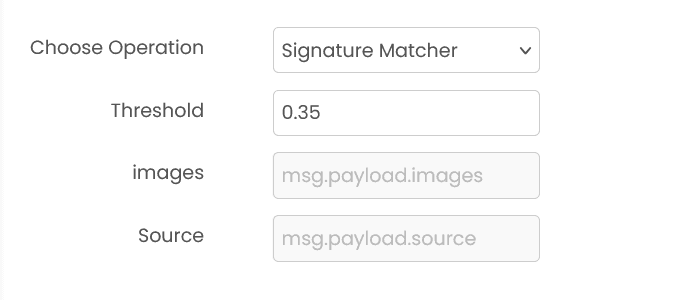
Threshold (required)
Similarity threshold (0-1) for determining if signatures match. Default: 0.35
Note: Lower values are more lenient (more matches), higher values are more strict.
Common Input Format
msg.payload.source (string)
Relative path of the source signature image on shared storage.
Example: "signatures/reference.png"
msg.payload.images (array)
Array of signature image paths to compare against the source.
Example: ["signatures/test1.png", "signatures/test2.png"]
Common Output Format
msg.payload (object)
msg.payload contains an output object with match results. match_score is a 0–100 similarity score.
Example:
{"output": {"matches": [{"image": "test1.png", "match_score": 89.0, "is_match": true}]}}Example
Input (msg.payload)
{
  "source": "signatures/reference.png",
  "images": ["signatures/test1.png", "signatures/test2.png"]
}
Output (msg.payload)
{
  "output": {
    "matches": [
      { "image": "test1.png", "match_score": 89.0, "is_match": true },
      { "image": "test2.png", "match_score": 25.0, "is_match": false }
    ]
  }
}
Errors
When the block fails, it raises an error. Use a Catch block in your flow to handle failures and inspect the error payload.
Common mistakes
- Invalid image path: Source or comparison image paths are incorrect or files don't exist on shared storage.
- Unsupported format: Image format is not supported. Use standard image formats (.png, .jpg, .jpeg).
- Invalid threshold: Threshold must be between 0 and 1.
- Empty images array: No comparison images provided in msg.payload.images.
- Service unavailable: The service is unavailable or unreachable.
Best Practices
- Use clear, high-resolution signature images for better comparison accuracy
- Ensure signatures are properly cropped with minimal background noise
- Start with threshold 0.35 and adjust based on your security requirements
- Lower threshold (0.2-0.3) for more lenient matching, higher (0.4-0.5) for stricter verification
- Test with known matching and non-matching pairs to calibrate threshold
- Ensure consistent image quality and resolution across all signatures being compared
- Always validate results in production authentication systems
- Consider using multiple verification methods for critical authentication scenarios
PDF Processor
Provides PDF utilities such as searchability checks, OCR, table extraction, and splitting PDFs into images.
Table Structure Recognition
Detects and extracts table structures from document images. It identifies table cells, rows, columns, and can output the table data in HTML or JSON format.