Reports
Reports
View analytics and performance metrics for verification projects
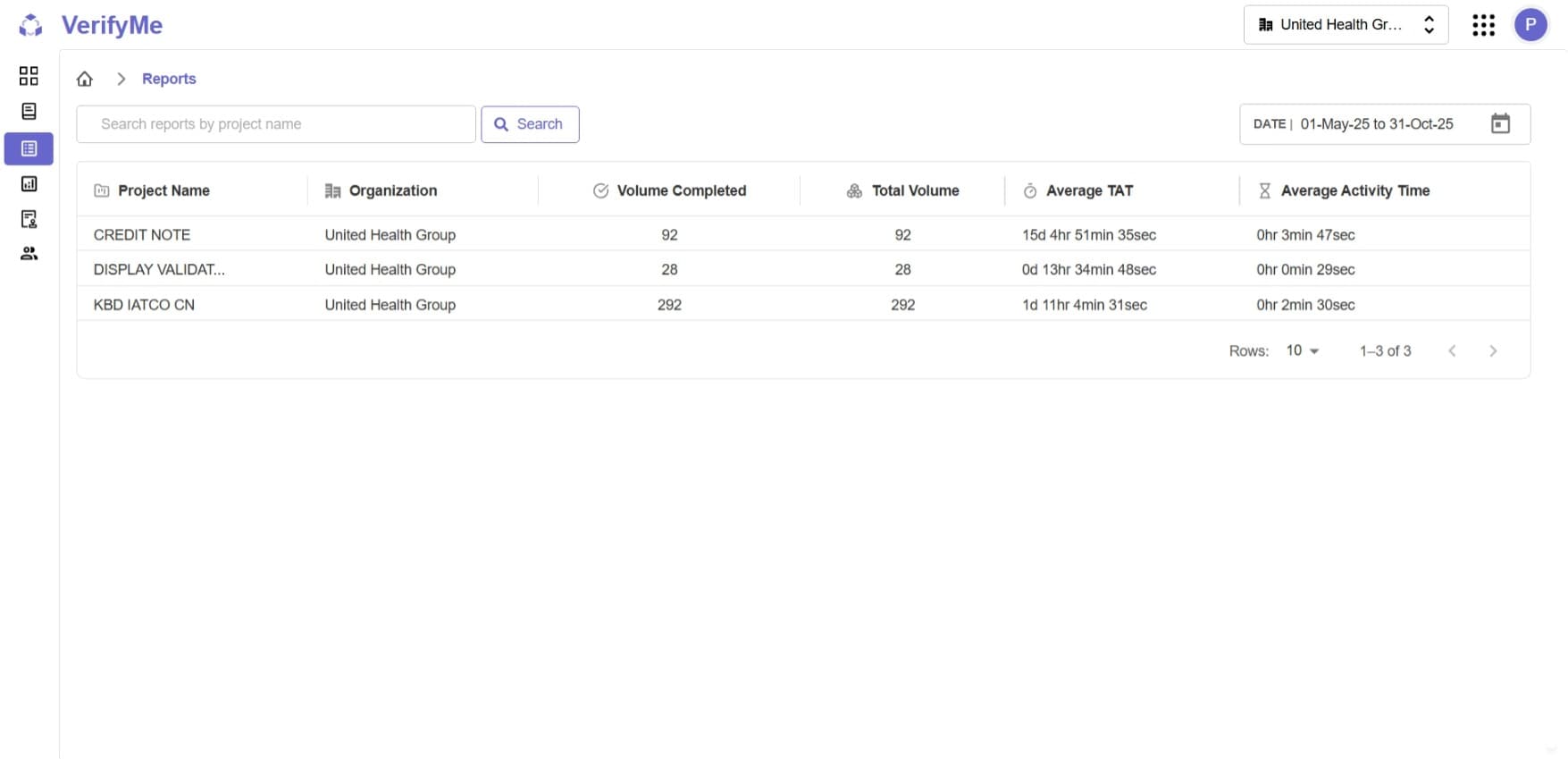
The Reports page provides comprehensive analytics and metrics for project verification activities within VerifyMe. This page displays key performance indicators including completion rates, turnaround times, and activity metrics for projects within your organization.
Access Control
Access Level: Organization Admin, QC Lead only
Only users with Organization Admin or QC Lead roles can access this page to view project performance data.
Report Table Columns
Project Name
- Displays: The unique identifier or name of the project
- Example: PROJECT1
Organization
- Shows: Which organization the project belongs to
- Example: RAP
Volume Completed
- Definition: Number of files/items that have been successfully verified and completed
- Use Case: Track completion progress and productivity
- Example: 5 files completed
Total Volume
- Definition: Total number of files/items assigned to the project
- Use Case: Understand project scope and calculate completion percentage
- Example: 5 files total
- Calculation: Completion Rate = (Volume Completed / Total Volume) × 100%
Average TAT (Turnaround Time)
- Definition: Average time taken from file assignment to completion
- Format: Days, Hours, Minutes, Seconds (e.g., 0d 0hr 7min 3sec)
- Use Case: Monitor efficiency and identify bottlenecks in the verification process
- Performance Indicator: Lower TAT indicates faster processing
Average Activity Time
- Definition: Average time actively spent working on files (excludes idle time)
- Format: Hours, Minutes, Seconds (e.g., 0hr 0min 22sec)
- Use Case: Measure actual productive time versus total turnaround time
- Insight: Compare with Average TAT to identify waiting/idle periods
Use Cases
For Organization Admins
- Monitor overall project performance across the organization
- Identify projects with high TAT that may need additional resources
- Track completion rates to ensure projects stay on schedule
- Compare activity time vs TAT to optimize workflow efficiency
For QC Leads
- Review team performance metrics
- Identify training opportunities based on TAT and activity time
- Ensure quality standards are maintained while meeting turnaround expectations
- Generate reports for stakeholders on project progress
Key Performance Indicators (KPIs)
Completion Rate
Calculate manually: (Volume Completed ÷ Total Volume) × 100%
- 100% = All files completed
- < 100% = Project in progress
Efficiency Ratio
Compare Average Activity Time to Average TAT:
- Higher ratio indicates more efficient use of time
- Lower ratio may indicate workflow delays or bottlenecks
Throughput
Track Volume Completed over the date range:
- Measures team productivity
- Helps with resource planning
Best Practices
- Regular Monitoring: Review reports weekly to catch issues early
- Date Range Analysis: Compare different time periods to identify trends
- Benchmark Setting: Establish target TAT and activity time standards
- Action on Outliers: Investigate projects with unusually high TAT
- Resource Allocation: Use completion data to balance workload across teams
Related Documentation
- Project Screen - Manage projects and track file status
- Quality Check Screen - Understand the verification workflow
- User Screen - Manage team members and assignments