Connection Details
Get Orchestrator URL, Organization ID, and Agent ID for RAPBot Agent
Before RAPBot Agent can connect, you need three values from Bot Management Console. These are the same connection details used when logging into Studio (Domain URL) plus organization and agent identifiers specific to the agent you are deploying.
What You Need
| Value | Used for |
|---|---|
| Domain URL | Base URL of your Orchestrator instance (e.g. https://orchestrator-v2.rapidautomation.ai) |
| Organization ID | Identifies the organization that owns the agent |
| Agent ID | Identifies the specific agent record created in Orchestrator |
RAPBot Agent also prompts for a machine description when connecting — a free-text label for this workstation (e.g. Finance-PC-01).
Get Details from Orchestrator
1. Create an Agent (if needed)
If the agent does not exist yet:
- Log in to Bot Management Console
- Open your organization
- Go to Agents and click Add Agent
- Set name, type (single/multi, attended/unattended), and time zone
- Click Create Agent
See Agents for agent types and configuration.
2. Open Agent Information
On the organization Agents list, click the info icon on the agent card. The Agent information dialog shows:
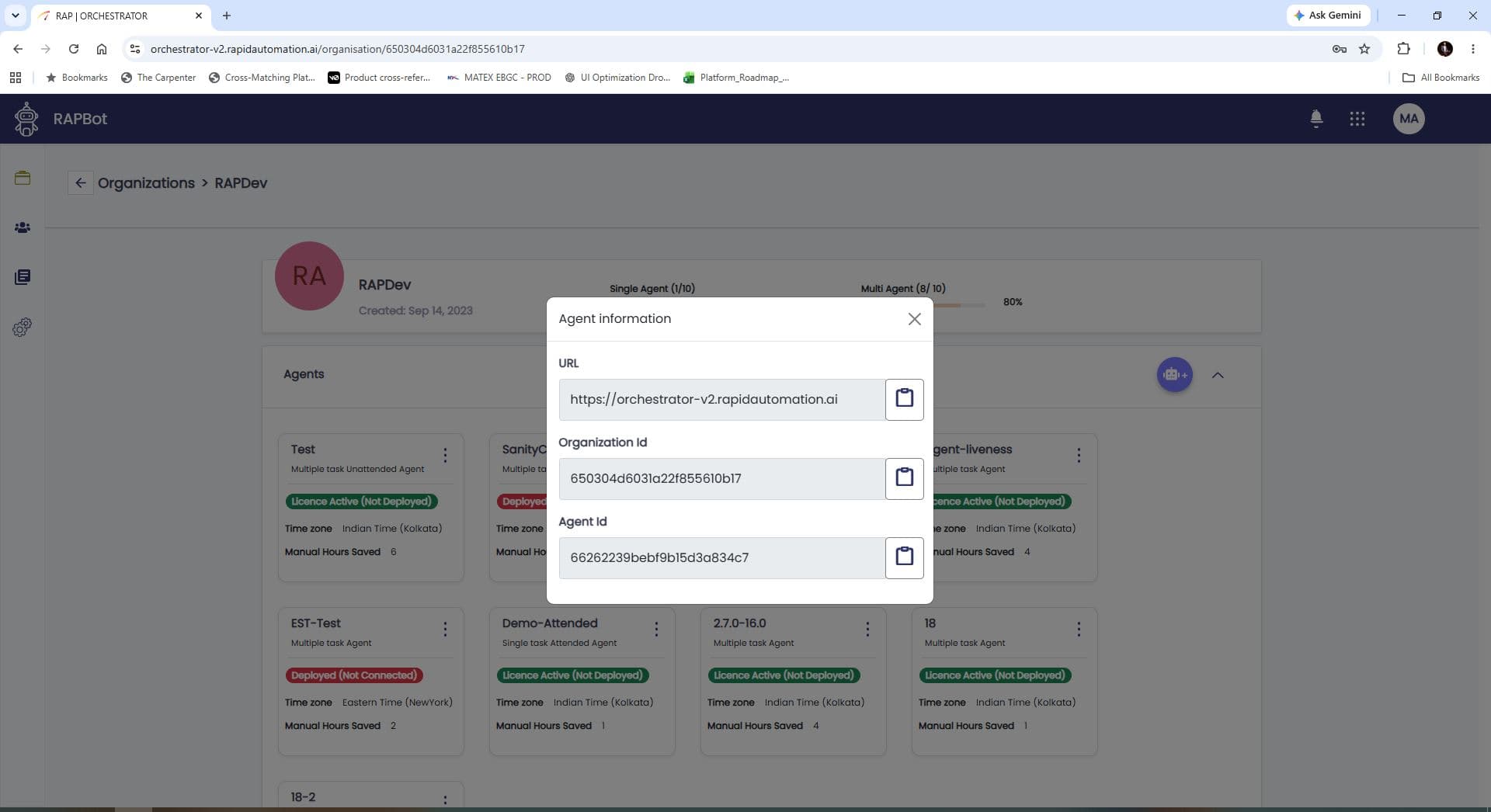
| Field | Description |
|---|---|
| URL | Orchestrator base URL — use as Domain URL in RAPBot Agent |
| Organization Id | Organization identifier (copy to clipboard) |
| Agent Id | Agent identifier (copy to clipboard) |
Copy all three values before connecting RAPBot Agent on the target machine.
3. Domain URL format
- Use the full URL shown in the dialog (e.g.
https://orchestrator-v2.rapidautomation.ai) - Do not add a trailing slash
- A green checkmark appears in the Agent form when the URL is valid
Studio vs Agent Connection
| Application | Fields |
|---|---|
| Bot Studio | Domain URL, Email, Password |
| RAPBot Agent | Domain URL, Organization ID, Agent ID, Machine description |
Studio uses user credentials for authoring tasks. The agent uses organization and agent IDs to register this machine as the execution endpoint for that agent.
Next Steps
- Connect the Agent — enter these values in the Agent Communicator form
- Bot Management Console Agents — agent status after connection