Task Runs
View task execution logs, status, and downloads in Bot Management Console
Task runs are recorded every time an agent executes a task — whether from a schedule, manual run, API trigger, or queue-driven flow. Use Task Execution Logs to audit history, troubleshoot failures, and download log files.
Open Task Execution Logs
- Log in to Bot Management Console
- Open an organization
- Open an agent detail page
- Click Show Logs in the agent header (list icon)
You can also navigate directly to the logs route for an agent: /organisation/{org_id}/{agent_id}/logs
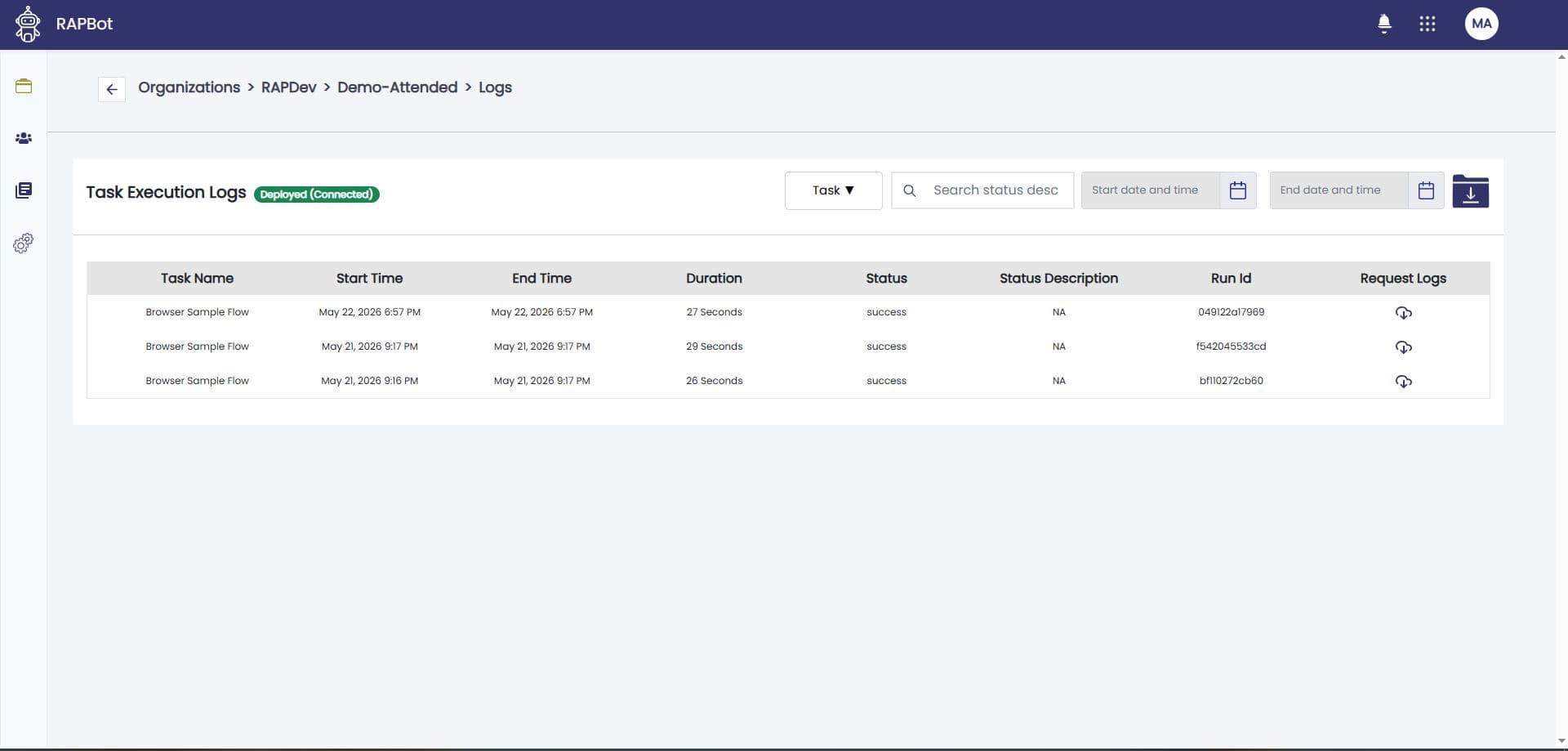
Log List
The Task Execution Logs page shows a table of runs with:
| Column | Description |
|---|---|
| Task | Task name that ran |
| Start time | When execution began |
| End time | When execution finished (if completed) |
| Status | Started, Completed, Failed, Stopped, Skipped, etc. |
| Reason | Failure or stop reason when applicable |
Filter and search
- Search by status description or task name
- Task name dropdown to limit to one task
- Start date and end date to narrow the time range
- Results load incrementally as you scroll
Run Details and Downloads
Select a run to inspect details. Depending on configuration you can:
- View execution metadata and failure reasons
- Download log files (full or cycle logs when generated)
- Request log refresh for runs where logs are still being written
Log content originates from the connected RAPBot Agent during execution (including print block log file output).
Status Meanings
| Status | Typical cause |
|---|---|
| Completed | Task reached an end block with Success status |
| Failed | end block Failed, unhandled error, or automation failure |
| Stopped | Operator stopped the run from Orchestrator |
| Skipped | Another task was already running on the same agent |
| Started | Run in progress |
Checkpoints
For active or recent runs, checkpoint messages from the agent (via the print block process checkpoint option) can be viewed from the agent task list in Orchestrator. Checkpoints help monitor long-running automations without waiting for completion.
Studio: print block
Notifications
Orchestrator can notify administrators on task execution events (started, completed, failed, stopped, skipped) when notification settings are configured for the organization.
Agent-Side Execution
Task runs are executed on RAPBot Agent. Orchestrator stores the audit trail and log references.