
python_env_setup
Set up and manage Python virtual environments for custom script execution.
python_env_setup Block
The python_env_setup block is used to create and configure Python virtual environments that can be used by python_custom_shell blocks and other Python-based operations.
Overview
The python_env_setup block manages Python virtual environments, ensuring proper isolation and dependency management for custom Python scripts. It creates isolated environments where Python packages can be installed without affecting the system Python installation.
Important: This block is used only once to create the virtual environment - it doesn't need to run every time during flow execution. Virtual environment names should be unique within the Flow AI project.
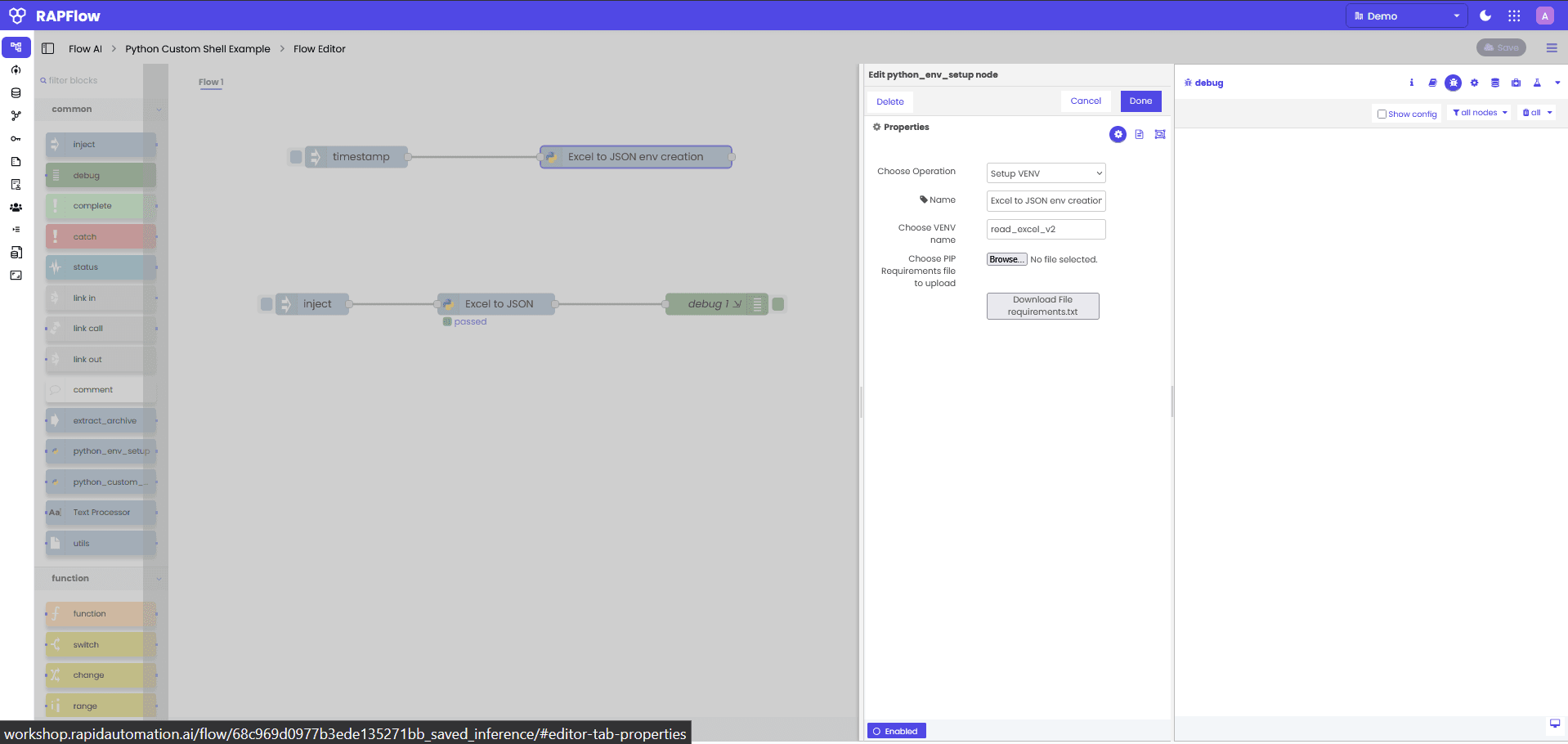
Configuration Options
Operation Types
Choose the type of environment setup:
- Setup VENV: Create a new virtual environment
- Install Packages: Install additional packages to an existing environment
- Update Environment: Update packages in an existing environment
- Clean Environment: Remove and recreate an environment
Virtual Environment Configuration
When using "Setup VENV" operation:
- Name: Descriptive name for the environment setup operation
- Choose VENV name: The name of the virtual environment to create
- Choose PIP Requirements file to upload: Upload a
requirements.txtfile - Download File requirements.txt: Download the default requirements file
Environment Management
- VENV Name: Unique identifier for the virtual environment (must be unique within the Flow AI project)
- Python Version: Specify the Python version to use
- Dependencies: Manage package dependencies through requirements.txt
- Isolation: Ensure complete isolation from system Python
- One-Time Setup: Environment is created once and can be reused across all flows in the project
How It Works
The python_env_setup block:
- Creates Environment: Sets up a new virtual environment with the specified name
- Installs Dependencies: Installs packages from the requirements.txt file
- Configures Paths: Sets up proper Python and pip paths
- Validates Setup: Ensures the environment is properly configured
- Reports Status: Provides feedback on the setup process
Environment Creation Flow
Trigger → Create VENV → Install Dependencies → Validate Setup → Report StatusImportant Notes:
- This block is used only once to create the virtual environment
- It doesn't need to run every time during flow execution
- Virtual environment names should be unique within the Flow AI project
- Created environments can be used across all flows in the same project
Use Cases
Project Setup
Set up environments for different projects:
trigger → python_env_setup (project A) → python_custom_shell (project A code)Dependency Management
Manage package dependencies:
requirements.txt → python_env_setup → validated environment → ready for useEnvironment Isolation
Create isolated environments for different tasks:
data processing env → python_env_setup → ml processing env → python_env_setupMulti-Version Support
Support different Python versions:
Python 3.8 env → python_env_setup → Python 3.9 env → python_env_setupCommon Patterns
Basic Environment Setup
// Configuration
Operation: Setup VENV
Name: "Excel Processing Environment"
VENV Name: "read_excel_v2"
Requirements File: requirements.txt

// requirements.txt content
pandas>=1.3.0
openpyxl>=3.0.0
numpy>=1.21.0
Machine Learning Environment
// Configuration
Operation: Setup VENV
Name: "ML Processing Environment"
VENV Name: "ml_processing"
Requirements File: ml_requirements.txt

// ml_requirements.txt content
scikit-learn>=1.0.0
tensorflow>=2.8.0
pandas>=1.3.0
numpy>=1.21.0
matplotlib>=3.5.0
Data Analysis Environment
// Configuration
Operation: Setup VENV
Name: "Data Analysis Environment"
VENV Name: "data_analysis"
Requirements File: analysis_requirements.txt

// analysis_requirements.txt content
pandas>=1.3.0
numpy>=1.21.0
matplotlib>=3.5.0
seaborn>=0.11.0
jupyter>=1.0.0
Advanced Features
Environment Validation
The block validates the created environment:
- Python Availability: Ensures Python is accessible
- Package Installation: Verifies all packages are installed correctly
- Path Configuration: Checks that paths are properly set
- Dependency Resolution: Resolves package conflicts
Error Handling
Comprehensive error handling:
- Creation Errors: Handles virtual environment creation failures
- Installation Errors: Manages package installation issues
- Permission Errors: Handles file system permission problems
- Dependency Conflicts: Resolves package version conflicts
Environment Reuse
Efficient environment management:
- One-Time Creation: Environment is created once and reused across flows
- Project-Wide Access: All flows in the same project can use the created environment
- Unique Naming: Virtual environment names must be unique within the Flow AI project
- Persistent Storage: Environments persist and don't need to be recreated for each flow execution
Configuration Examples
Standard Data Processing Environment
// Configuration
Operation: Setup VENV
Name: "Standard Data Processing"
VENV Name: "data_processing"
Requirements File: standard_requirements.txt

// Standard requirements
pandas>=1.3.0
numpy>=1.21.0
requests>=2.25.0
python-dateutil>=2.8.0
Custom Package Environment
// Configuration
Operation: Setup VENV
Name: "Custom Packages Environment"
VENV Name: "custom_packages"
Requirements File: custom_requirements.txt

// Custom requirements
pandas>=1.3.0
openpyxl>=3.0.0
pillow>=8.3.0
beautifulsoup4>=4.10.0
Tips
- One-Time Setup: Remember this block is used only once to create the environment
- Unique Names: Ensure virtual environment names are unique within the Flow AI project
- Use Descriptive Names: Choose clear, descriptive names for environments
- Version Pinning: Pin package versions in requirements.txt for reproducibility
- Minimal Dependencies: Only include necessary packages to reduce setup time
- Project-Wide Usage: Created environments can be shared across all flows in the same project
Common Issues
Environment Creation Failed
Error: Failed to create virtual environmentSolution: Check available disk space and permissions. Ensure Python is properly installed.
Package Installation Failed
Error: Failed to install package 'pandas'Solution: Check package name spelling and version compatibility. Ensure internet connectivity.
Environment Not Found
Error: Virtual environment 'read_excel_v2' not foundSolution: Ensure the environment was created successfully using this python_env_setup block before using it in python_custom_shell. Remember that virtual environment names must be unique within the Flow AI project.
Permission Denied
Error: Permission denied when creating environmentSolution: Check file system permissions and ensure the application has write access to the storage directory.
Environment Lifecycle
Creation Phase
- Validate Requirements: Check requirements.txt format and package availability
- Create Directory: Set up environment directory structure
- Install Python: Set up Python interpreter in the environment
- Install Packages: Install all required packages
- Validate Setup: Test the environment configuration
Usage Phase
- Environment Activation: Activate the environment for script execution
- Package Access: Make installed packages available to scripts
- Path Management: Ensure proper Python and package paths
- Execution Support: Support script execution in the environment
Maintenance Phase
- Package Updates: Update packages as needed
- Environment Cleanup: Remove unused environments
- Dependency Resolution: Resolve package conflicts
- Performance Optimization: Optimize environment performance
Related Blocks
- python_custom_shell - For executing Python scripts in the created environment
- function - For simple JavaScript-based operations
- debug - For monitoring environment setup status