Blocks & Flow EditorBrowser
get text
The **get text** block extracts visible text from an element on the current tab.
The get text block extracts visible text from an element on the current tab.
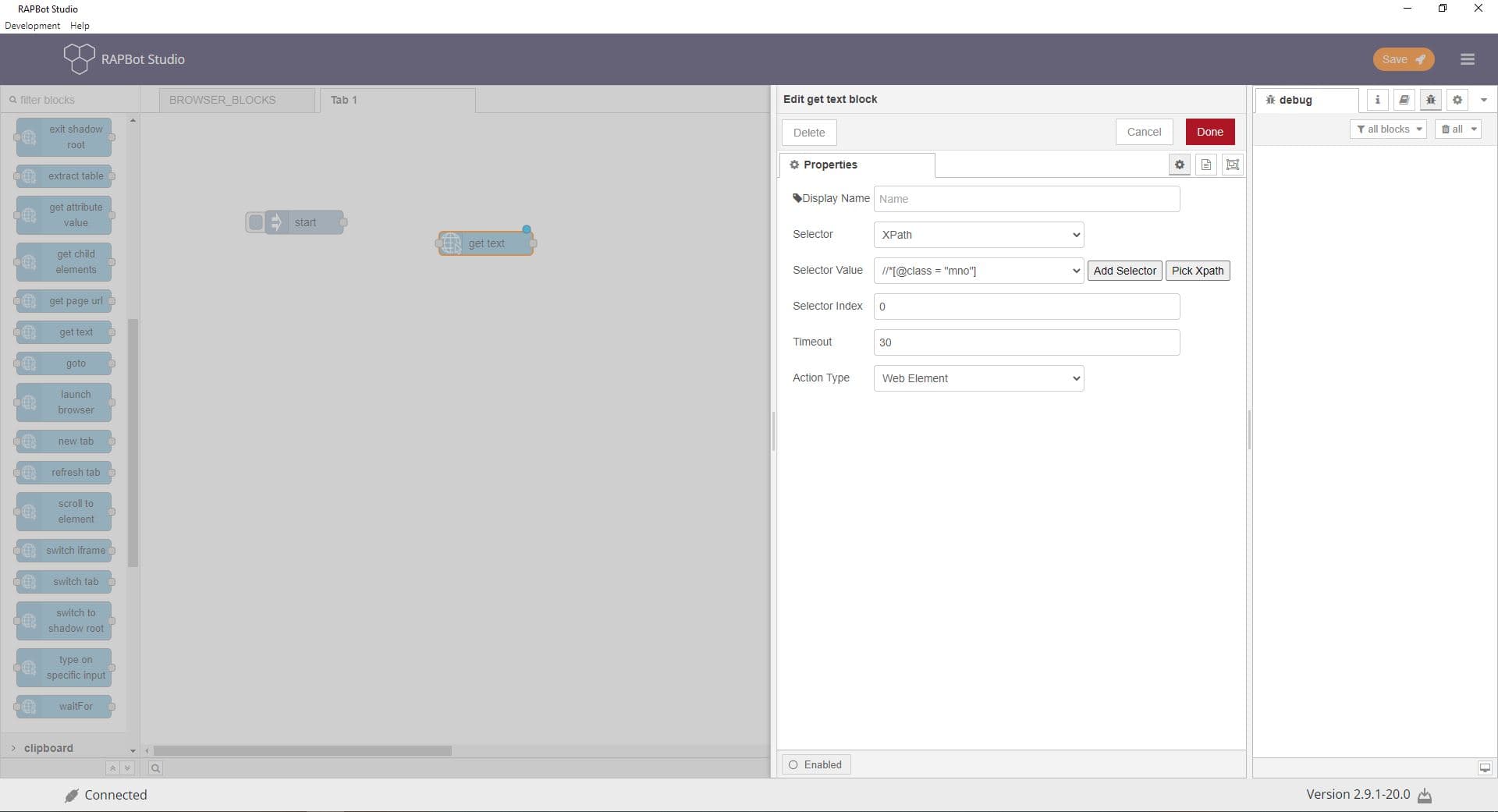
Configuration
| Field | Description |
|---|---|
| Display Name | Optional label shown on the block in the canvas. |
| Selector | Choose XPath or CSS Selector. XPath navigates HTML/XML structure; CSS Selector locates elements by pattern (Selenium syntax). |
| Selector Value | The selector expression — copy and paste from inspector or XPath Picker. |
| Selector Index | When multiple elements match, pick by index. Index starts at 1 (not 0). |
| Timeout | Maximum wait time in seconds for the element to appear (default 30). Supports decimals (e.g. 0.3). |
| Action Type | Web Element — interact with visible HTML. Javascript — access hidden or shadow-DOM elements. |
| Add Selector | Type or paste an XPath and press Enter to add it to the selector list. |
| Pick XPath | Use the XPath Picker Chrome extension: click an element on the page to capture its XPath, then verify via the dropdown. |
Outputs
| Property | Description |
|---|---|
msg.payload | Extracted text content |
Notes
- Browser operation blocks require launch browser to be used earlier in the flow.